Connection Setup
Re-authenticating social platforms
It’s perfectly normal for your social media accounts to occasionally disconnect from Feedlio. This can happen for security reasons (like a password change), social platform updates, or simply because your access token has expired.
How to Re-authenticate Social Media Accounts
If your posts fail to deliver, it is most often because the access token for platforms like Facebook or Instagram has expired or been invalidated. This can happen for several reasons, such as updating your password or when the platform detects security activity on your account.
Fortunately, this can be easily resolved directly within Feedlio:
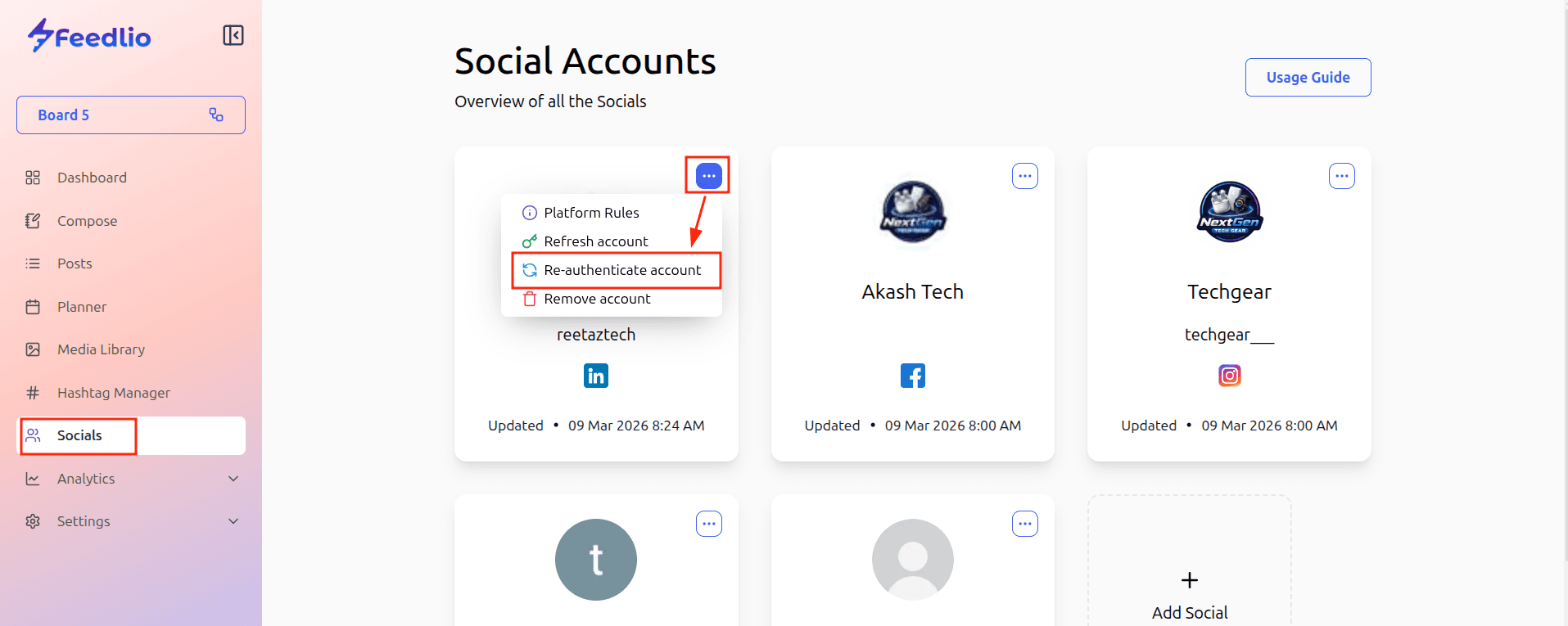
- Navigate to Socials: Go to the Socials page.
- Locate the Account: Find the specific social platform account that is failing.
- Open the Options Menu: Click the "..." (three dots) button next to the account.
- Re-authenticate: Select Re-authenticate to refresh your connection.